
There are many sensors in your phone and your Microphone and Camera are important to protect your privacy. When we install Apps, they ask for a variety of permissions some of which may not really be needed for efficient performance of the app. You don’t want apps to use your camera and microphone when no such usage is warranted. It is therefore important to routinely check on app permissions.
To check which of your apps are using your camera and microphone, open the Settings menu on your Android phone. In settings, search for Privacy or App Permissions. Once you are here, you can look up which of your apps are using your Camera and which your Microphone. Each one will display the apps in four parts – Allowed all the time, Only while in use, Ask Everytime and Disabled. You may choose any option as per your and your app’s needs. If you have any doubt about any app using your Camera or Microphone unauthorisedly, you may choose to disable the permission and if the app will not work if the permission is not granted, just uninstall the app immediately. This will improve and set your privacy settings as per your needs.

 This powerful app turns your device into a versatile portable document scanner, complete with OCR text recognition capabilities, with the free-to-use Adobe Scan App. The app uses your smartphone’s camera and scans photos in order to convert them to high-quality PDF files. Use this app to turn anything – receipts, notes, documents, photos, business cards, just anything – into an Adobe PDF or JPG file with content which you can share and re-use. Once scanned, you can enhance your scans with Adobe’s scanning and editing app.
 If you are a fan of mindmapping, if you love to capture your thoughts directly on mindmaps, if you wish to synchronize your maps to the cloud from any device, Mindomo is the right tool for you.
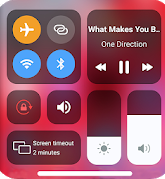 This is a simple app which allows you to easily access the control center on your phone. No more struggling with menus and options deep inside your phone – it simply allows you to change your settings visually. It helps you to quickly change settings like WiFi, Bluetooth, Screen Rotation, HotSpot, DND, Brightness, Flashlight and many more.
 For those who want to learn something new during their intermittent home stay these days, Learn HTML is a free app which helps you learn HTML 5 with 50+HTML lessons. It will teach you the latest standards of HTML with detailed explanations and examples with the option to try it out yourself.
 This is an easy and powerful tool to manage your files on Android devices. You can manage your files, folders, cloud storage and more. As soon as you install and start this app, you can visually see the files and folders on your device and how much space they occupy. It supports every file management actions (open, search, navigate directory, copy and paste, cut, delete, rename, compress, decompress, transfer, download, bookmark, and organize). File Manager Plus supports media files and major file formats including apk.
 On-lyneTech